
What You're Actually Looking At
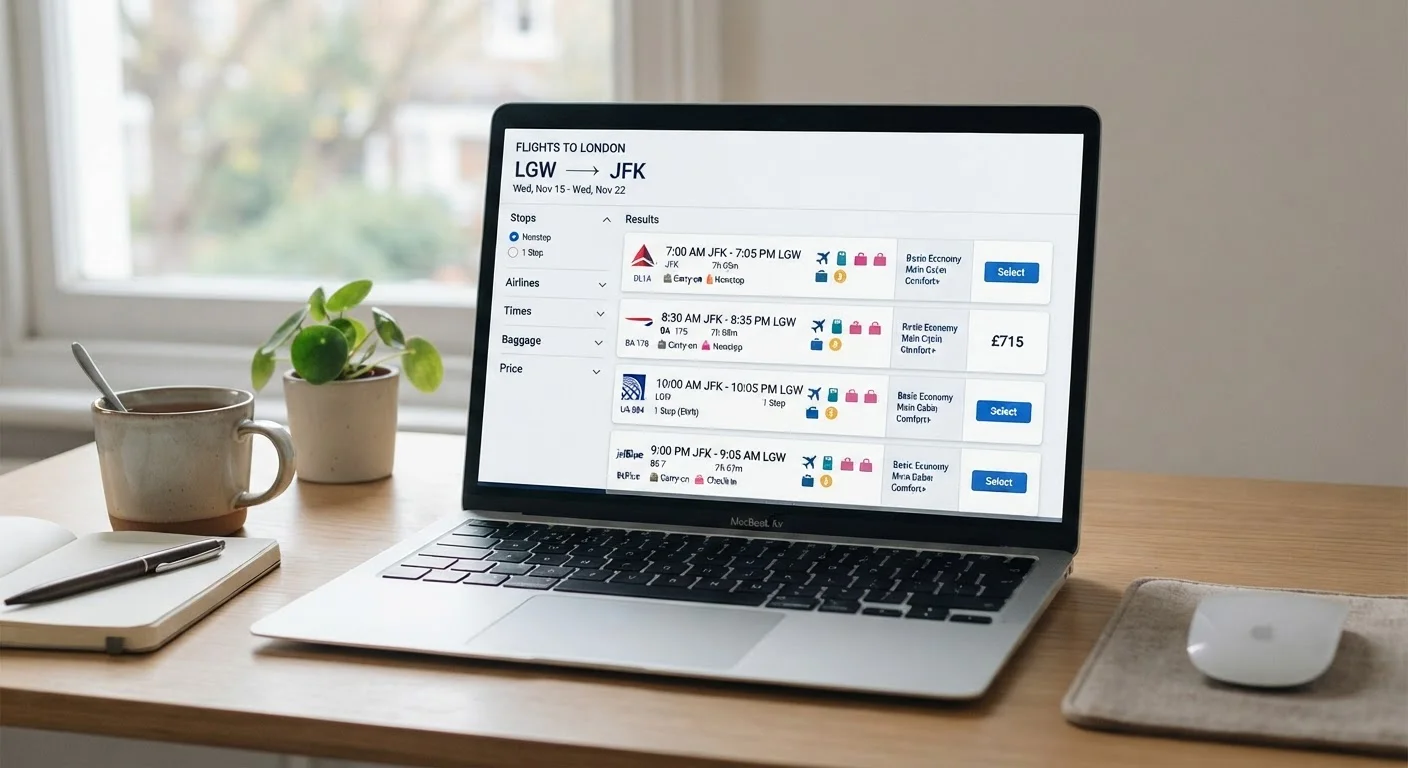
Open any flight search tool and the results page can feel like a dashboard designed for engineers. Rows of flights, cryptic codes, colored badges, and a left-hand column of filters all compete for your attention at once. Before clicking anything, it helps to understand how these pages are structured.
Most results pages are divided into three zones: a filter panel (usually on the left or top), a results list in the center, and occasionally a price calendar or map view you can toggle. The results list is where flights appear as individual cards or rows, each summarizing one itinerary option.
Each flight card typically shows: departure and arrival times, total travel duration, number of stops, airline name, and a base price. Additional icons communicate baggage allowances, fare restrictions, and sometimes cabin class. Getting comfortable with this layout is the first step toward reading results confidently. For a full walkthrough of what comes after you choose a flight, see our complete flight booking walkthrough.
| Nonstop vs. Direct | Nonstop = no stops. Direct = same flight number but may land briefly en route. |
| Time zone shown | All times are local to the departure or arrival city, not your home time zone. |
| Minimum safe connection time | 60 min domestic / 90 min international (general guidance; varies by airport and airline). |
| Base price displayed | Typically per person, one way, before taxes and fees are added at checkout. |
| Baggage icon meaning | Hover over the icon - a tooltip specifies whether carry-on, personal item, or checked bag is included. |
| Sort default | Most tools default to 'Best' - a blend of price and travel time. Switch to 'Price' to see cheapest first. |
Decoding the Key Elements on Every Flight Card
Here's what the most commonly misunderstood elements on a flight card actually mean:
- Departure / Arrival times: Always shown in local time at each airport. A flight leaving New York at 9:00 PM and arriving in London at 10:30 AM lands the next calendar day - watch for the small "+1" indicator that signals an overnight trip.
- Duration: This is total door-to-door travel time, including any layovers. A 14-hour total with a 2-hour layover means roughly 12 hours in the air.
- Stops: "Nonstop" means no landings between origin and destination. "1 stop" means one intermediate landing - you may or may not change planes. "Connection" and "layover" are used interchangeably; the length matters because very short connections (under 60 minutes for domestic, under 90 minutes for international) carry a real risk of missing your next flight if the first arrives late.
- Baggage icons: A small suitcase icon with an X or a dash usually means no checked bag is included. A filled suitcase typically means one bag is included. Always hover over or tap these icons - the tooltip explains exactly what's covered.
- Fare type labels: Words like "Basic," "Standard," "Flex," or "Refundable" are shorthand for fare classes. Basic fares are generally the cheapest but the most restrictive - changes and cancellations may not be permitted. Fare classes explained in full covers what each tier includes before you commit.
Fare class
A letter code (e.g., Y, B, Q) assigned to a ticket that determines its price, flexibility, and included services. Within economy alone there can be many fare classes with different rules.
Layover
A scheduled stop between two flights on the same itinerary. During a layover you remain in the connecting airport until your next flight departs.
Basic Economy
The most restrictive and typically least expensive fare tier. It often excludes seat selection, carry-on bags, and the ability to change or cancel the ticket without a fee.
Codeshare
An arrangement where two airlines share the same physical flight but sell seats under different flight numbers. You may book with one airline and board a plane operated by another.
Operating carrier
The airline that physically operates the aircraft on a given flight, which may differ from the airline that sold you the ticket.
Personal item
A small bag (such as a backpack or purse) that fits under the seat in front of you. Almost all fare types, including Basic Economy, allow one personal item at no extra charge.
Using Filters Without Overcomplicating Things
Filters narrow down results, but applying too many at once can eliminate genuinely good options. Focus on the filters that matter most to your situation:
- Number of stops: If you want nonstop only, set this first. It dramatically reduces the list and eliminates connection-risk anxiety.
- Departure time window: A slider lets you limit results to morning, afternoon, or evening departures. Useful if you need to arrange airport transport at a specific time.
- Max price: Set a ceiling, not a floor. You want to see everything under your budget, not just the cheapest single option.
- Baggage included: Some tools let you filter for fares that include a carry-on or checked bag. Useful if you know you'll need luggage and want an apples-to-apples price comparison.
Avoid filtering by airline unless you have a specific loyalty program reason - restricting carriers often hides perfectly suitable, lower-cost options.
Prices Shown Are Starting Points, Not Final Totals
The price displayed on a results page is almost always the base fare before taxes, government fees, and any add-ons are applied. The final total typically appears only at checkout, after you select your seats and baggage options. Always review the itemized price breakdown before entering payment details to avoid surprises.
Once you're comfortable booking flights, exploring airport know-how will prepare you for the day of travel itself.